God of War Ghost of Sparta Psp HD Textures Mediafire Android Pc

Download ⭐️ God of War Ghost of Sparta Psp Textures HD Usa Europe Multilanguage Free 1 link Mediafire, apk, download emulator ⏬ android ppsspp, apple, mac os x. 🔥⚔️ God of War: Ghost of Sparta PSP with HD Textures is absolute madness, brother 😳🔥. Seeing this game with high-definition textures is like reliving Kratos’ story but with a sharpness that makes every hit, every spark, and every scream sound more brutal than ever 💥👹⚔️.
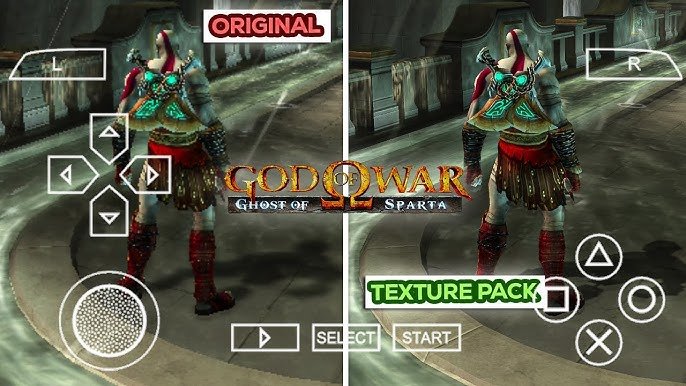
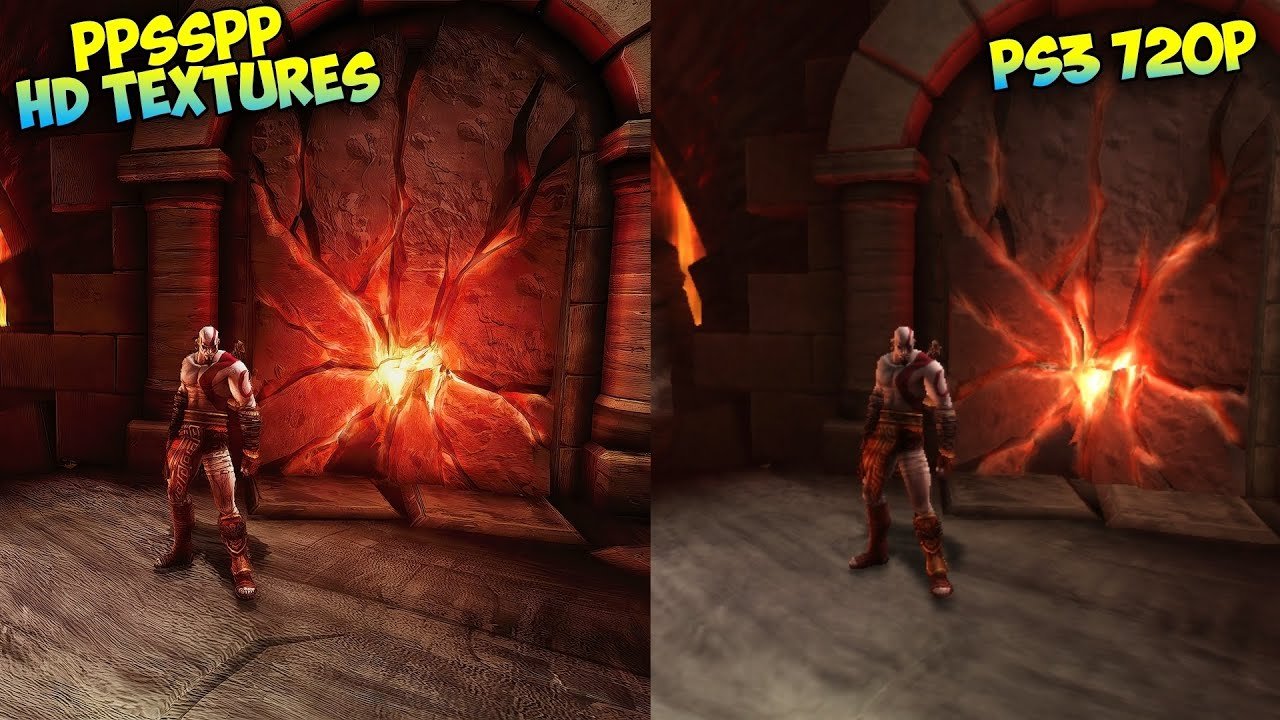
The game was already powerful on PSP, but with HD Textures everything changes: the environments look more alive, the models are more detailed, the fire burns with more fury 🔥🔥, and the Blades of Athena look freshly sharpened ✨⚔️. Kratos feels wilder, more defined, more full of rage… his skin, his scars, his shadows, everything stands out like you’ve activated a secret “ultra” mode 🤯💀.

Instalation
Unzip the compressed files and you’ll get a folder called “PSP”.
Inside the “PSP” folder, you’ll find the “TEXTURES” folder, and inside that, you’ll find a folder with a strange name, for example, “NPUG80325”. This folder contains all the HD texture files.
Open the PSP emulator, select the game, and hold down the button until the game settings appear. Then select: Game Settings / Tools / Developer Tools. In Developer Tools, check the “Save New Textures” option.
Start the game and play for a few seconds. Thanks to the “Save New Textures” option, a folder called “TEXTURES” will be created in the PSP emulator’s installation directory (if you want to know the location, in the emulator, select: Preferences / System / Memstick Folder; this will show you the path where you installed the PSP emulator).
Inside the “TEXTURES” folder that was just created, folders will automatically be created for each game you play, each with an ID. For example, “UCES00842” would be the ID for God of War: Ghost of Sparta. (How do I know that this ID is for God of War: Ghost of Sparta? Because when you select that game and hold down the button until the game settings appear, the game data will be displayed, and you’ll see the game ID there.)

What we need to do, IN EXAMPLE, is rename the folder “NPUG80325” (which we downloaded) and replace it with the name of the game’s ID, which in this EXAMPLE case would be “UCES00842”.
Once we’ve changed the name, copy the folder (which is now called “UCES00842”) into the “TEXTURES” folder (which was created where you installed the PSP emulator).
That would be all, remember that the IDs vary depending on the texture you are downloading, the ID I put here is an example.
Title: God of War Ghost of Sparta – HD Textures
Language: English Multilanguage

Size: 310 Mb
Region: Usa/Eur
Formatt: File of Textures

The battles become even more intense with that visual upgrade ⚡👊. The combos shine, the enemies look more threatening, and the cutscenes —which were already top-tier— feel almost like a mini epic movie 🎥🔥. Exploring Atlantis, facing giant monsters, dealing with Kratos’ past… everything looks so detailed it’ll win over even the toughest fan of the saga 😤❤️.

Download
Base Game:

Base Game: HD Textures

Mediafire

Password : www.pspgamesland.com

Tutorial Pasar La publicidad

The gameplay remains the same solid gem: frantic action, platforming, puzzles, huge bosses, and a story that hits hard. But when you combine it with those HD textures, the game feels like a mini home-console God of War stuffed inside your PSP 🏺⚔️🩸. God of War, Ghost of Sparta, PSP, HD Textures, Kratos, Action, Hack and Slash, Mythology, Combos, Giant Bosses, Atlantis, Visual Enhancements, Remaster Feel, Spartan Rage, Chains of Athena, Enhanced Graphics ⚔️🔥👹✨🎮

Leave a Reply

Your email address will not be published. Required fields are marked *

Go up